
Keeping your profile up to date helps other members connect with you and ensures your information is accurate within the AAR community. You can also watch a video overview of these instructions.
Step 1: Log In to Your AAR Account
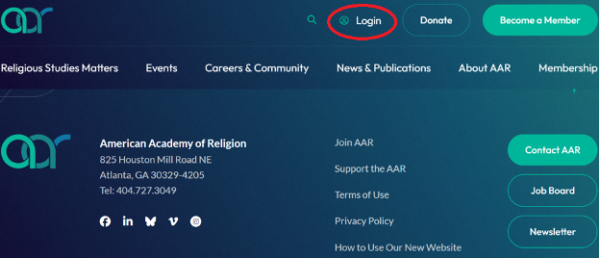
- Navigate to www.aarweb.org.
- Click Login at the top of the page.
Enter your login credentials and sign in.
Step 2: Access Your Profile
- Once logged in, click My AAR Profile located at the top of the page.

Step 3: Edit Your Profile Information
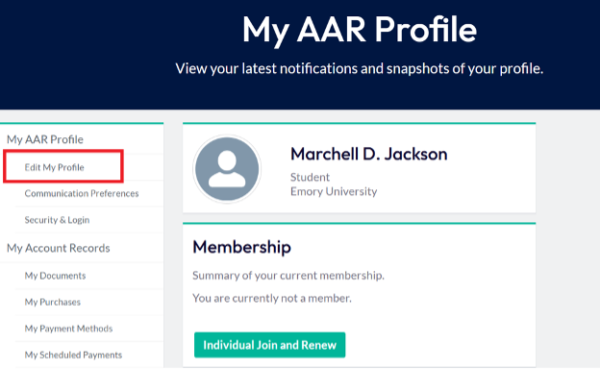
- Your profile page will open.
- On the left-hand side of the page, locate the navigation panel and click Edit My Profile.
Step 4: Complete Your Profile Details
To help complete your member profile, please fill out the following sections:
- About Me
- Contact Details
- Educational Details
Please note, the demographic information you fill out will not be visible in the member directory; it will only be used by staff in aggregate for grant applications or to send info about specific opportunities for particular constituencies.
After entering or updating your information, scroll to the bottom of the page and click Save.
Step 5: Add Your Research Interests
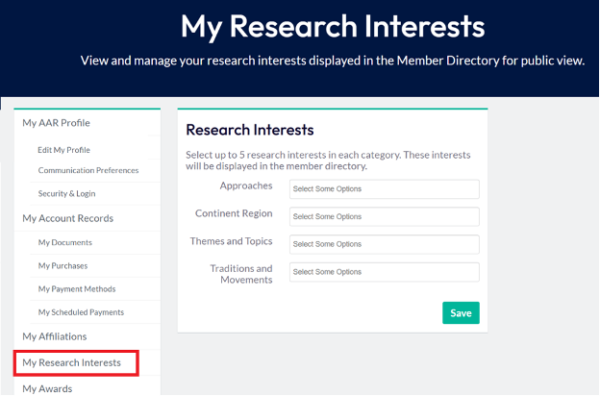
- Scroll to and click on My Research Interests on the side panel.
- Add research interests in at least two (2) categories.
- Click Save to finalize your updates.
Profile Completion Reminder
To ensure your profile is considered complete, please:
- Complete all fields in the About Me, Contact Details, and Educational Details sections.
- Add research interests to at least two categories.
- Save your changes after each section is updated.
Thank you for keeping your AAR member profile current and complete.